Updated October 2026
Straight answer
Network wiring in Boston homes usually means running ethernet through old plaster and lath walls to offices, TVs and ceiling access points, so the Wi-Fi works on every floor. We fish Cat 6 or Cat 6A cable, terminate it at wall jacks and a labeled patch panel, test each run, and keep it clear of electrical wiring.
Why Wi-Fi fails in old Boston houses
Plaster on wood lath, brick party walls and foil-backed insulation all eat Wi-Fi signal. A single router in the living room rarely covers a three-story house, and mesh units that relay wirelessly lose speed with each hop. A wired backbone fixes that: ethernet to each access point and to the rooms where speed matters most, such as a home office or a TV.
Low voltage cable is easy to damage and easy to run badly. It should not share a hole with power wiring, it should not be pulled tight around sharp bends, and every run should be tested, not just plugged in and assumed. We plan the routes so each drop serves its spot and the runs come back to one place you can find later.
Ethernet, access points and media panels
Ethernet runs
If video calls freeze in the home office or the TV buffers while the router sits two floors down, a wired connection is the dependable fix. We pick a route from the network closet to the room, usually through a closet, a basement ceiling or an old chase, and fish Cat 6 cable to a wall jack. In plaster houses we keep openings small and patchable. Each run is terminated, tested end to end and labeled at both ends. The trade-off is route: the shortest path is not always the one that avoids opening finished walls, so some runs take a longer way around.
Wi-Fi access point drops
Ceiling-mounted access points cover a house far better than a router on a shelf, but each one needs an ethernet cable and, usually, power over that same cable. We help you place them by floor and by wall type, run a cable to each spot and mount a low-profile box or bracket. Power over ethernet means no outlet is needed at the ceiling, as long as the switch or injector supports it. Two or three well-placed access points usually beat several mesh units, but they do require cable work rather than a plug-in setup.
Structured media panels
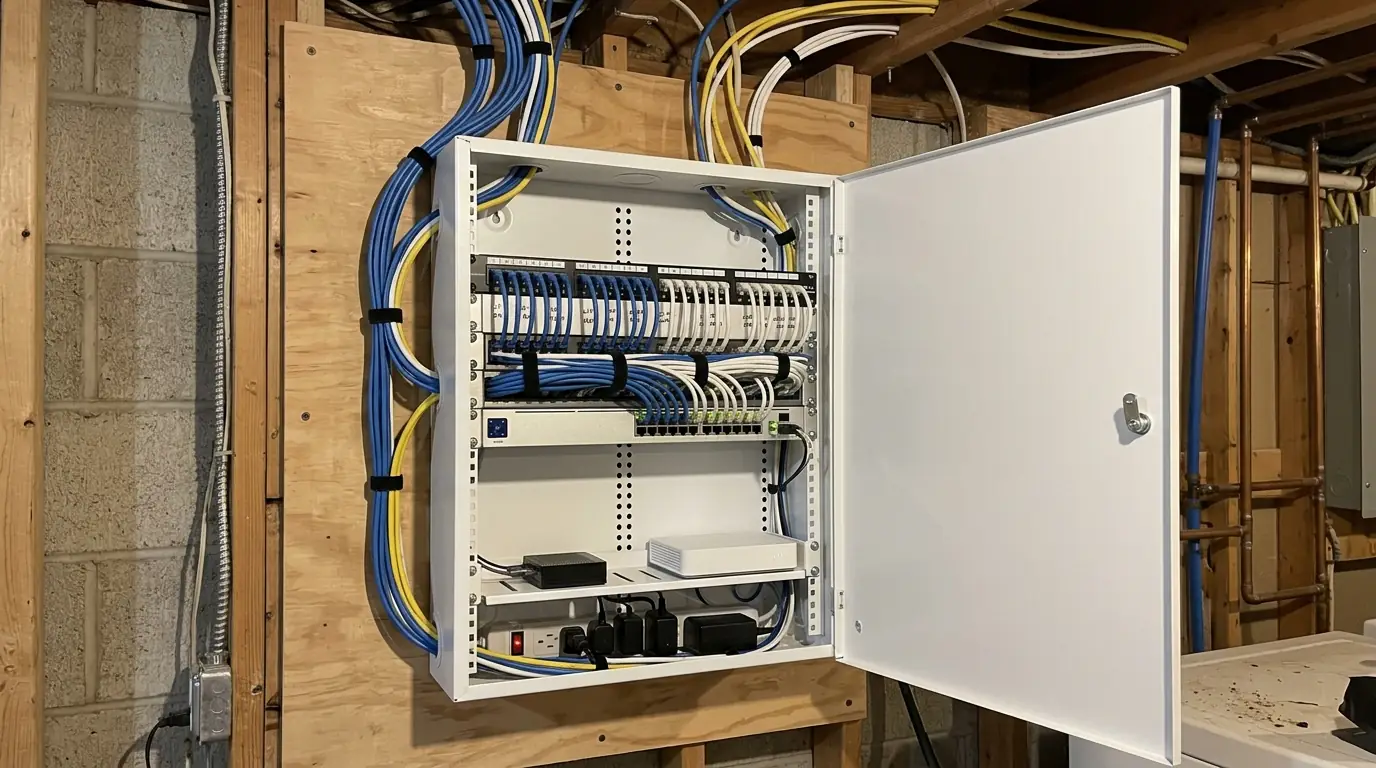
When a house has a dozen cables ending in a tangle behind the router, a structured media panel brings them into order. We mount an enclosure in a basement or closet, terminate the runs on a patch panel, add a dedicated outlet for the modem, router and switch, and label each port to its room. A media panel near the electrical panel is convenient, but low voltage and power still need separation inside walls and enclosures. The panel adds some cost up front, and it is what lets you or your internet provider troubleshoot later without guessing.
Dead zones upstairs? Call and we will plan the drops.
Call (617) 843-6591What sets the price of network wiring
Network wiring is priced on the number of drops and how hard each route is. These factors make the most difference.
- Number of drops. Each run, jack and patch panel port adds labor and material.
- Wall and ceiling type. Plaster and brick take longer to fish through than open framing.
- Cable grade. Cat 6A costs more and is stiffer to pull than Cat 6.
- Floors crossed. A run from basement to third floor needs a clear vertical path.
- Media panel and power. An enclosure, patch panel and dedicated outlet add to the first visit.
Access points, mesh or a direct cable?
Most homeowners are choosing between three ways to fix weak coverage.
| Option | Good for | Trade-off |
|---|---|---|
| Wired access points | Even Wi-Fi on every floor | Needs a cable to each ceiling spot |
| Wireless mesh units | Quick fix with no cable work | Speed drops through plaster and brick |
| Ethernet to the device | Office desks, TVs, game consoles | Fixed location, one cable per spot |
Running cable through pre-war walls
Wi-Fi dead spots in older houses usually come down to the walls. Massachusetts holds an unusually high share of homes built before 1940, and their dense plaster, brick party walls and balloon framing soak up wireless signal in a way drywall does not. Running Ethernet to an access point on each floor fixes most of it. Balloon framing often lets us drop a cable from attic to basement in one bay, while blocked bays need another route. Data cable is still covered by the state electrical code, which is the 2023 NEC plus Massachusetts amendments, so we keep it separated from power runs.
What a network wiring job includes
- Site walk to find weak coverage and planned drops
- Route plan for each run from the network closet
- Cat 6 or Cat 6A cable fished through walls and ceilings
- Wall jacks and ceiling access point boxes mounted
- Patch panel or structured media enclosure
- Dedicated outlet for modem, router and switch where needed
- End-to-end test and label for every run
How we wire a house for network
Walk the house
We look at where signal drops off and where you need wired speed.
Plan routes and drops
Each run gets a path, a jack location and a port on the panel.
Fish and mount
Cable is pulled with small openings and kept apart from power wiring.
Terminate and test
Every run is terminated and tested end to end for faults.
Label and hand over
Jacks and patch panel ports are labeled, with a room list for you.
Network and low voltage questions
For most homes, Cat 6 handles current speeds on the run lengths inside a house. Cat 6A makes sense for long runs or if you want headroom for faster equipment later.
Often, using closets, basement ceilings and old chases. Some runs need small openings, which we keep tight and square so a plasterer or painter can patch them easily.
Not usually. Most take power over the ethernet cable from a PoE switch or an injector at the media panel, so the only thing at the ceiling is one cable and a mounting bracket.
Usually. Wired access points do not lose speed relaying signal between units through plaster and brick, so coverage and speed tend to be more even from the basement to the top floor.
It should not. Low voltage and power wiring need separation to avoid interference and to meet code, so we drill separate holes or keep a clear gap where the two run alongside each other.
We wire, terminate and test the cabling and mount the access point boxes and media panel. Router and Wi-Fi network configuration is usually done by you, your IT person or your internet provider.